In this section we will be building off of the project in the year seven section. Even If you aren't year seven, you sould have made a project similar to the one shown there. In this more advanced section we will be adding variables and sound effects, as well as randomising the ball movement a little bit to make the game more interesting.
Adding variables
Variables are a pretty complicated thing in programming. They are basically numbers that can change over time, and they can be used to add more interesting things to your game.
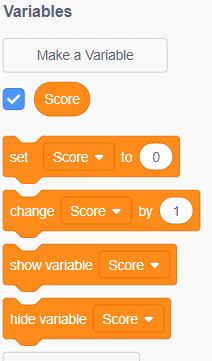
Go to the orange "variables" tab on the block selector. You should have one already made called "my variable", which you can ignore. Click "Make a variable" and add one called "Score".
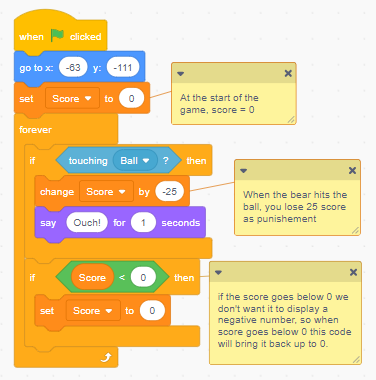
After this go to the code for the bear. At the start of the code under "when green flag clicked" add the orange block "[Set [Score] to (0)]". This does as you might expect, making the score start at zero at the start of the game.
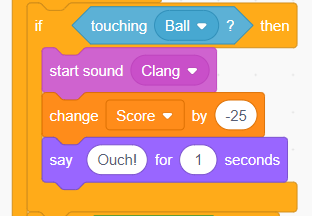
To create some punishement when the bear hits the ball, go to the collision code and add the block [Change (Score) by (-25)] above the block [Say (Ouch!) for (1) seconds] to make the score decrease by a large amount when it hits the ball. You can change this value, to be nicer or meaner.
Add some code to make the score variable set to zero when score drops below zero ( Score < 0 )
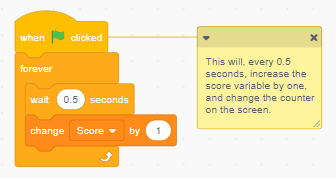
Finally, create another block of code and another forever loop. Make it so that every so often it increases the score by 1. This will make the score constantly increase during the game and the longer you play, the higher score you get.
And that's the tricky part for this section over!
Sound Effects
Sound effects are some of the most important parts of videogames, without them a game feels kind of flat and boring.
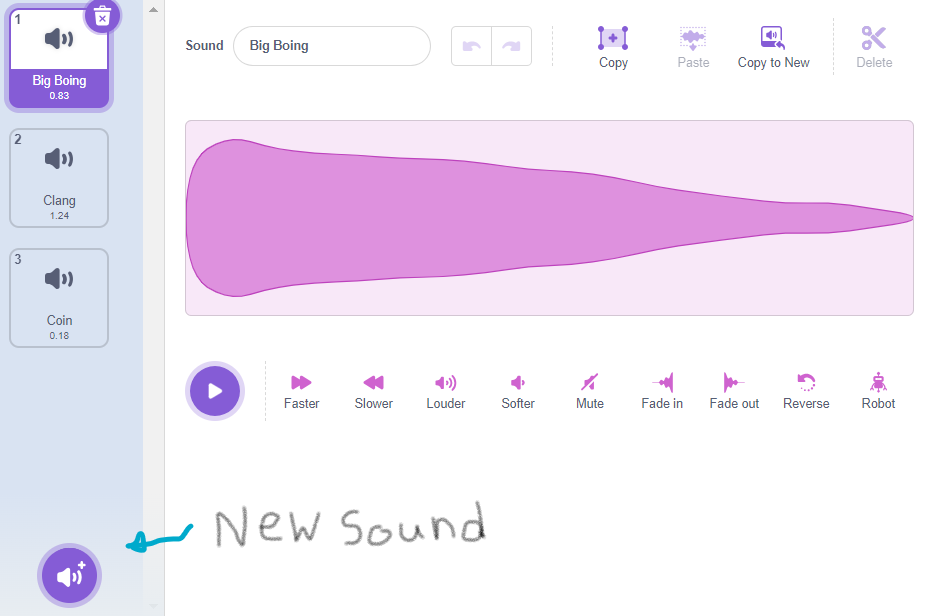
Some sounds effects we probably want is sounds when you lose or gain score and a jumping sound. To add these, go into the bear sprite and go to the sounds tab in the top left. There will already be a sound in there, but you can delete that to choose your own. Choose a jump sound, a sound for gettin hit and a sound for gaining score.
For this I'm choosing "Big Boing", "Clang", and "Coin". Feel free to edit the sounds you choose to create your own, the fun is in customising them!
Next go back into the Bear's code and go into the Sound section. Get the block [Start sound (Coin)] and drag it above the block [Say (Ouch!) for (1) seconds]. Change the sound to your getting hit sound.
When the bear touches the ball, this will start playing the sound and then say "Ouch!" which gives you an audio cue that you've been hit.
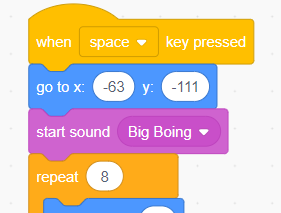
To add the jumping sound go to the "when space key pressed" piece of code and add another "start sound" block, and change it to your jumping sound.
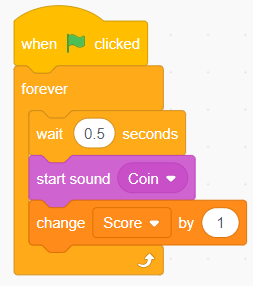
Lastly, add the block to play the "gaining score" sound above the block that gives you score. As you can see, its fairly simple to tell where to put the sound blocks.
That's the end of the year 8 section! Continue on to the year 9 section if you want to improve your game further.
~~~~~~~~~~~~~~~
~~~~~~~~~~~~~~~
~~~~~~~~~~~~~~~
~~~~~~~~~~~~~~~
~~~~~~~~~~~~~~~